You spend weeks researching, drafting, and publishing a flagship technical guide or launching a new product feature. You proudly copy the URL and share it in a company Slack channel, post it to LinkedIn, or tweet it on X. But instead of an eye-catching rich preview with a crisp branded banner and compelling headline, the shared card looks broken: the image is missing or cropped awkwardly, the description displays navigation boilerplate (like "Menu, Home, About Us..."), or the link renders as an unstyled plain text string.
Social media sharing cards and messaging link unfurls are governed by the Open Graph Protocol (og:*) and Twitter Card specifications. In this guide, we diagnose why social share previews fail, how social platform crawler caches operate, and how to configure metadata that renders beautifully across every platform.
The Core Open Graph Architecture
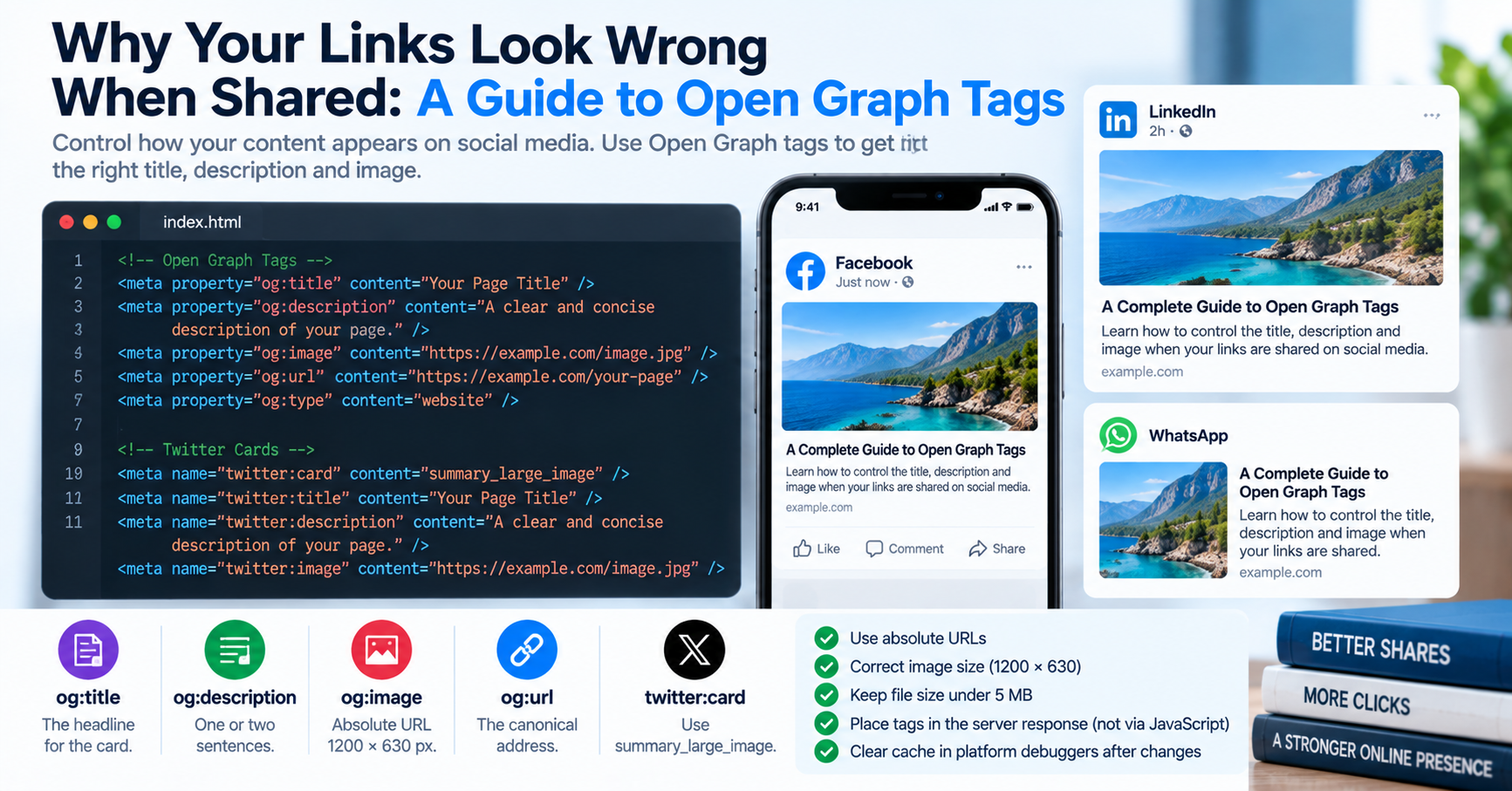
Originally engineered by Facebook in 2010 and adopted universally across LinkedIn, Slack, Discord, WhatsApp, Telegram, and Pinterest, Open Graph tags transform basic web pages into rich graph objects within social feeds:
| Open Graph Tag | Standard Value | Common Implementation Mistake |
|---|---|---|
og:title |
Compelling headline (max 60–90 chars) | Including repetitive site-wide branding suffixes that push keywords out of view. |
og:description |
Concise teaser copy (150–200 chars) | Leaving empty, causing scrapers to grab navigation or cookie banner copy. |
og:image |
1200 × 630 pixels (1.91:1 ratio) | Using relative paths (e.g., /banner.png) or serving over HTTP. |
og:url |
Authoritative canonical URL | Including temporary UTM tracking query parameters. |
The Three Most Common Social Card Failures
1. Relative URLs on og:image
Social crawlers (such as facebookexternalhit, LinkedInBot, or Twitterbot) do not execute full DOM resolution engines. If your HTML declares <meta property="og:image" content="/assets/img/hero.png">, the crawler will fail to resolve the absolute hostname and drop the image entirely. All Open Graph images must declare absolute HTTPS URLs: https://tuwebtools.com/assets/img/hero.png.
2. Incorrect Image Aspect Ratios & File Sizes
Modern social platforms mandate a 1.91:1 aspect ratio, with the universal standard resolution being 1200 × 630 pixels (minimum 600 × 315 px). If your image is square or vertical, LinkedIn and X will crop the sides, cutting off logos and text. Additionally, social scrapers enforce strict payload limits: images exceeding 5 MB or requiring over 3 seconds to download are discarded.
3. Aggressive Scraper Caching
When you share a URL on LinkedIn, Facebook, or Slack for the first time, their edge servers scrape your HTML, parse the Open Graph tags, and cache the rendered card in their CDN for weeks. If you fix a typo in your title or replace your hero image, sharing the URL again will still display the old cached preview. You must force platforms to re-scrape the URL using official debugging tools:
- Facebook / Messenger: Facebook Sharing Debugger
- LinkedIn: LinkedIn Post Inspector
- X / Twitter: Twitter Card Validator
Complete, Production-Ready Metadata Template
<!-- Primary HTML Metadata -->
<title>High-Performance Web Utilities | TU Web Tools</title>
<meta name="description" content="Explore free, privacy-first developer tools.">
<link rel="canonical" href="https://tuwebtools.com/tools">

<!-- Open Graph / Facebook / LinkedIn / Slack -->
<meta property="og:type" content="website">
<meta property="og:url" content="https://tuwebtools.com/tools">
<meta property="og:title" content="High-Performance Web Utilities | TU Web Tools">
<meta property="og:description" content="Explore free, privacy-first developer tools.">
<meta property="og:image" content="https://tuwebtools.com/assets/img/social-card.png">
<meta property="og:image:width" content="1200">
<meta property="og:image:height" content="630">

<!-- Twitter Cards -->
<meta name="twitter:card" content="summary_large_image">
<meta name="twitter:title" content="High-Performance Web Utilities | TU Web Tools">
<meta name="twitter:description" content="Explore free, privacy-first developer tools.">
<meta name="twitter:image" content="https://tuwebtools.com/assets/img/social-card.png">
Audit and validate your live social tags instantly using our free client-side Meta Tags Checker.