Every search engine optimization strategy begins in the Search Engine Results Page (SERP). Before a prospective visitor ever reads your opening paragraph, interacts with your UI, or converts into a paying customer, they must choose your link over nine competing search results. If your title tag is too long, search crawlers truncate it with an ellipsis (...), cutting off your primary value proposition and brand name. If your meta description is poorly optimized, Google will discard it entirely and generate its own snippet from random on-page text.
Despite this, many SEO guides still promote obsolete advice like "keep titles under 60 characters." In this guide, we explore how Google actually renders title and snippet text using proportional pixel measurements, why search engines rewrite metadata, and how to engineer snippets that maximize organic Click-Through Rate (CTR).
Pixels vs. Characters: The Proportional Font Reality
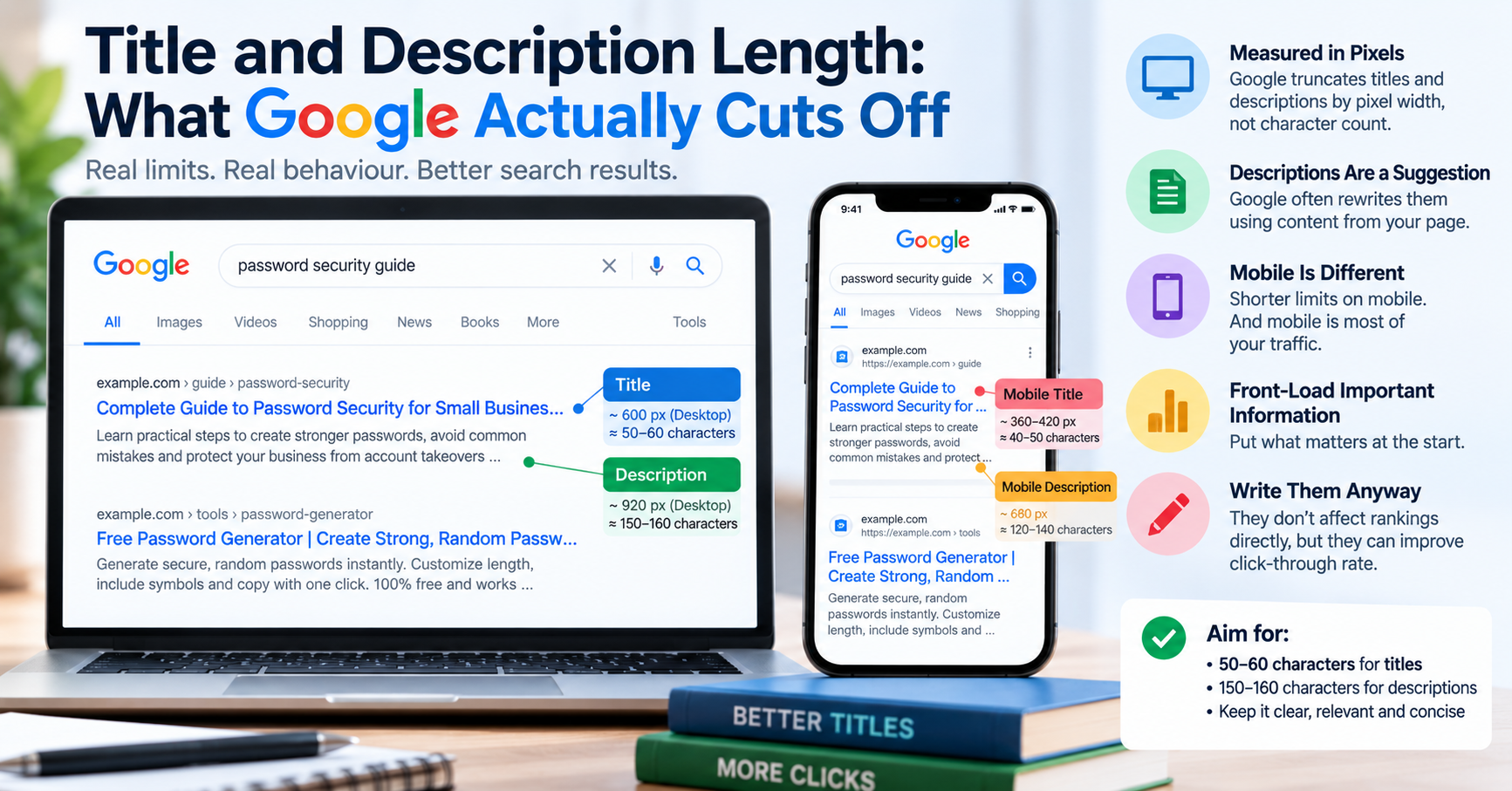
Google renders search result headlines using a proportional sans-serif typeface (historically Arial or Roboto) set at approximately 20px font size. In a proportional font, individual characters do not consume equal physical width:
- An uppercase
'W'or'M'consumes approximately 17–19 pixels of width. - A lowercase
'i','l', or't'consumes only 4–6 pixels of width.
Therefore, a title tag composed of 55 characters containing many wide letters (e.g., "WOMEN'S SWIMMING CHAMPIONSHIP PREVIEW") can measure over 640 pixels wide and be aggressively truncated. Conversely, a title of 65 characters with narrow letters (e.g., "Little digital utilities list") can fit completely without truncation.
| SERP Element | Pixel Limit (Desktop) | Pixel Limit (Mobile) | Recommended Character Target |
|---|---|---|---|
Title Tag (<title>) |
~600 pixels | ~600 pixels (often wraps to 2 lines) | 50 – 58 characters |
| Meta Description | ~960 pixels | ~680 pixels | 150 – 155 characters (desktop) / 120 (mobile) |
Why Google Rewrites Your Title Tags in SERPs
In August 2021, Google rolled out a major update to how it generates web page titles in search results. Google confirmed that it no longer relies exclusively on the declared HTML <title> tag. When Google detects that a title tag is substandard, it dynamically replaces it with text extracted from the page's <h1> header, anchor text, or internal links. The most common triggers for title rewrites include:
- Keyword Stuffing: Repetitive keyword lists (e.g., "Shoes, Buy Shoes, Cheap Shoes Online | ShoeStore").
- Boilerplate Site-Wide Titles: Pages that share identical default titles (e.g., "Home" or "Untitled Document").
- Extreme Length: Titles that exceed 700 pixels are frequently rewritten to match on-page H1 headlines.
- Missing Brand Delimiters: Google routinely appends your brand name if omitted.
Engineering High-CTR Snippets: The Anatomy of a Perfect Title
To maximize both crawl efficiency and human click-through rates, follow this proven structural formula:
[Primary Target Keyword] - [Compelling Value Proposition] | [Brand]- Front-Load Keywords: Place your primary target search phrase within the first 30 characters so users scan it immediately.
- Incorporate Actionable Hooks: Words like Guide, Free, Online, 2026, Checklist, Fast improve click intent.
- Test Across Devices: Check your title and description using our free Character Counter and Meta Tags Checker before publishing.