In modern cybersecurity, single-factor authentication—relying solely on a username and password—is fundamentally obsolete. Massive credential breaches, automated credential-stuffing botnets, and sophisticated phishing campaigns mean that passwords can be intercepted or cracked. Two-Factor Authentication (2FA), also known as Multi-Factor Authentication (MFA), mitigates this by requiring proof across two distinct authentication categories: Something you know (your password) and Something you have (a physical device, security token, or authenticator app).
However, many users treat all 2FA methods as equivalent. In reality, the security guarantees between receiving a text message and tapping a hardware security key are worlds apart. In this guide, we analyze the cryptographic mechanisms, threat vectors, and real-world vulnerabilities of the three dominant 2FA methods.
The Comprehensive 2FA Security Comparison
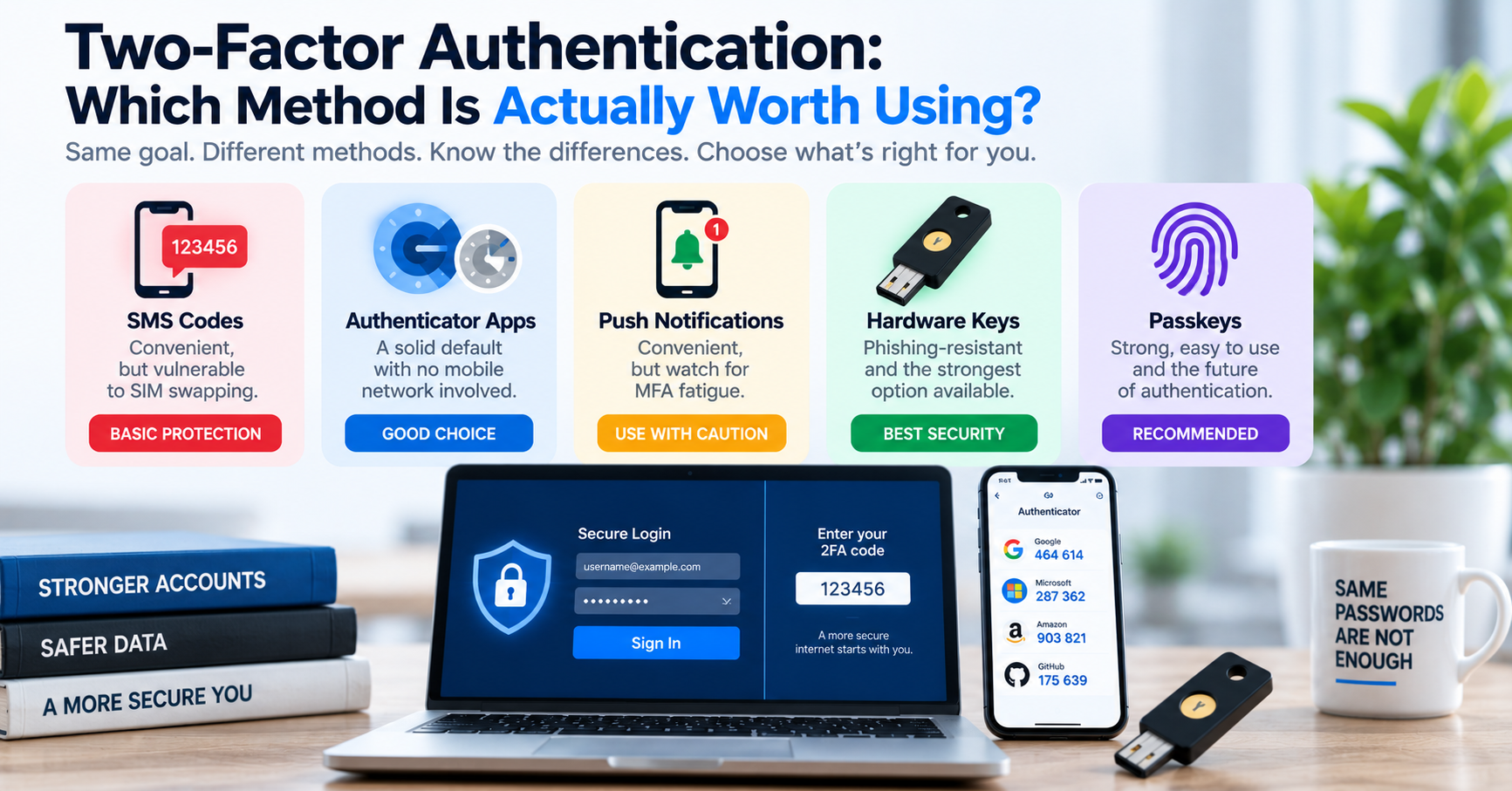
| 2FA Method | Technical Mechanism | Phishing Resistance | Primary Vulnerability |
|---|---|---|---|
| SMS / Voice Call | Cellular network SS7 transmission of 6-digit one-time code. | Zero (Easily phished via reverse proxies). | SIM swapping, cellular interception, carrier insider threats. |
| TOTP Authenticator Apps | RFC 6238 time-based HMAC algorithm computing 30-second codes. | Moderate (Vulnerable to real-time reverse proxies like Evilginx). | Device malware, unencrypted cloud backups of TOTP seeds. |
| FIDO2 / WebAuthn Keys | Asymmetric public-key cryptography tied to origin domain. | Complete (Cryptographically Unphishable). | Physical loss of hardware token (mitigated with backup keys). |
Why SMS 2FA is Dangerously Flawed
While SMS 2FA is better than having no second factor at all, security authorities strongly advise migrating away from it due to critical structural vulnerabilities:
- SIM Swapping: Attackers impersonate the victim through social engineering or bribing mobile carrier store employees to port the victim's phone number to an attacker-controlled SIM card. Once ported, the attacker receives all incoming SMS verification codes, resetting bank and email accounts in minutes.
- SS7 Network Exploits: Signalling System No. 7 (SS7), the international telecommunication routing protocol, lacks modern cryptographic authentication. Sophisticated threat actors routinely intercept SMS text messages in transit across international networks.
- Real-Time Phishing Proxies: Reverse proxy frameworks like Evilginx intercept the victim's typed SMS code and immediately submit it to the genuine website within the 60-second validity window.
How TOTP Authenticator Apps Work (RFC 6238)
Time-Based One-Time Password (TOTP) apps—such as Google Authenticator, Aegis, 1Password, or Microsoft Authenticator—generate codes offline without cellular connectivity. The process relies on a shared secret key (often shared via a QR code):
# Algorithmic calculation of a TOTP code
import hmac, hashlib, time, struct

def generate_totp(secret_bytes: bytes, interval: int = 30) -> str:
    # 1. Calculate time counter (number of 30-second intervals since Unix epoch)
    counter = int(time.time() // interval)
    counter_bytes = struct.pack(">Q", counter)

    # 2. Compute HMAC-SHA1 hash
    hmac_hash = hmac.new(secret_bytes, counter_bytes, hashlib.sha1).digest()

    # 3. Dynamic truncation
    offset = hmac_hash[-1] & 0x0F
    code_int = struct.unpack(">I", hmac_hash[offset:offset+4])[0] & 0x7FFFFFFF

    # 4. Modulo to 6 digits
    return str(code_int % 1000000).zfill(6)
FIDO2 & WebAuthn: The Gold Standard of Unphishable Security
Hardware security keys (such as YubiKey or Google Titan) implement the W3C WebAuthn and FIDO2 standards. Unlike SMS or TOTP, where a human types a number into a web form, WebAuthn performs a cryptographic challenge-response handshake directly between the hardware key and the browser.
Crucially, the browser automatically cryptographically binds the authentication request to the exact domain origin (e.g., tuwebtools.com). If an attacker lures you to a phishing domain like tuwebto0ls.com, your hardware key mathematically refuses to sign the authentication challenge, rendering the phishing attack completely ineffective.
Recommended 2FA Action Plan
- Upgrade your primary email account, financial services, and password manager to FIDO2 WebAuthn hardware keys.
- Use open-source, encrypted authenticator apps (such as Aegis on Android or 2FAS on iOS) for services that do not yet support WebAuthn.
- Always generate and store offline emergency backup codes in a secure, physical location.