Quick Response (QR) codes have achieved universal adoption in modern life. From restaurant menus, municipal parking meters, and airline boarding passes to two-factor authentication provisioning and digital payments, QR codes provide an effortless bridge between the physical and digital worlds. However, this convenience introduces a profound cybersecurity vulnerability: human eyes cannot read optical barcode matrices.
When an attacker displays a malicious hyperlink on a physical flyer or in a phishing email, a vigilant user can inspect the URL, spot typosquatting domains (such as micros0ft.com), and decline to click. But when that same malicious URL is encoded inside a QR code, the link is completely hidden until after the user scans it. This attack methodology is known as Quishing (QR Code Phishing), and cybersecurity agencies worldwide report exponential increases in quishing-driven corporate data breaches.
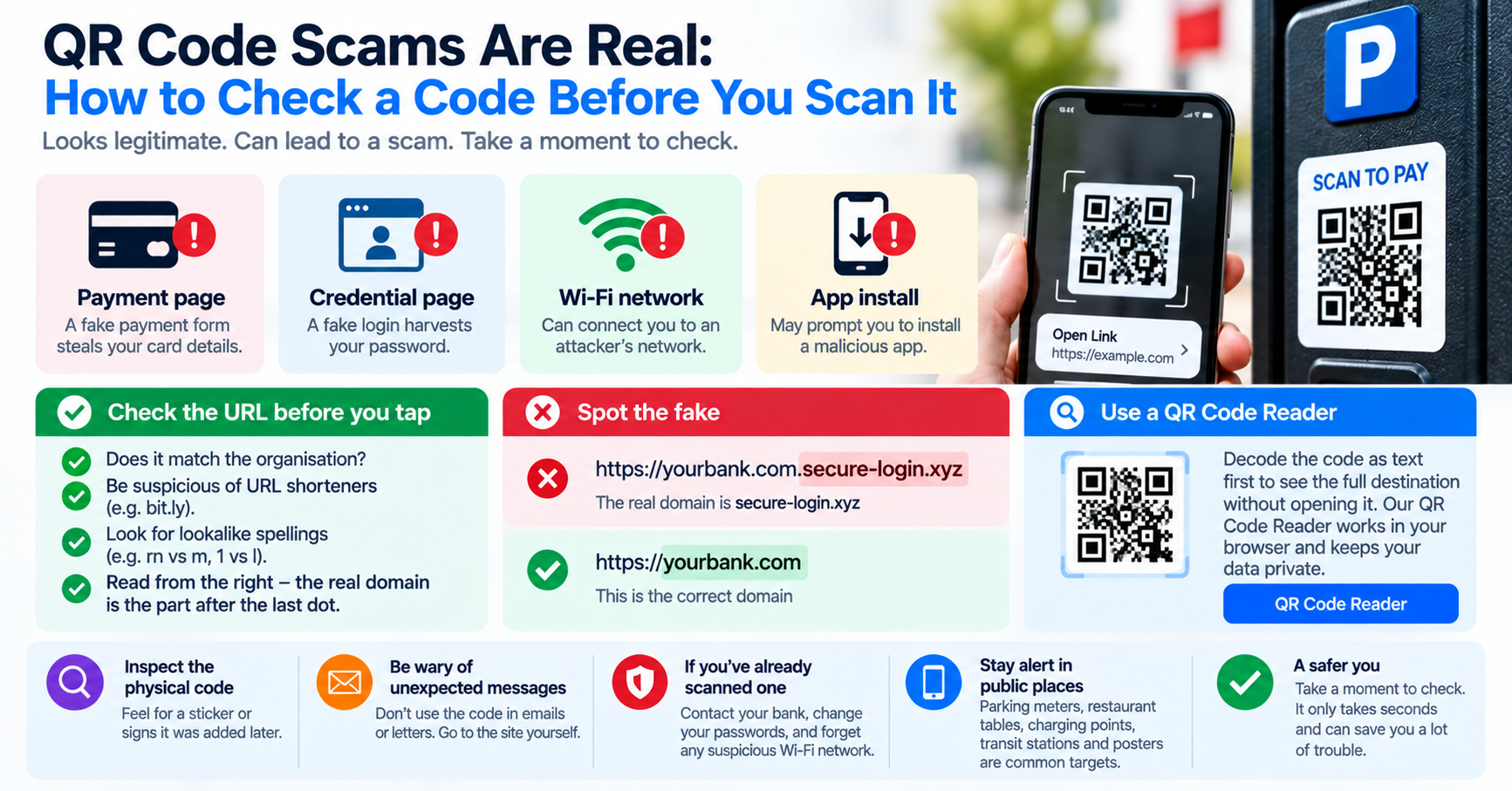
The Four Primary Quishing Attack Vectors
| Attack Vector | Physical or Digital Method | Attacker Objective |
|---|---|---|
| Physical Sticker Overlay | Pasting adhesive QR stickers over legitimate parking meters or restaurant codes. | Diverts credit card payments to rogue merchant accounts. |
| Email Security Gateway Bypass | Sending corporate phishing emails containing an image of a QR code rather than a text link. | Bypasses automated email link scanners; harvests Microsoft 365 login credentials. |
| Malicious Wi-Fi Onboarding | QR code encoded with WIFI:S:Free_Airport;T:WPA;P:...;; payload. |
Connects victim to rogue access point for Man-in-the-Middle (MitM) credential interception. |
| Crypto Wallet Address Swapping | Displaying QR codes encoding attacker wallet addresses on checkout invoices. | Reroutes cryptocurrency transfers irrevocably. |
Why Secure Email Gateways (SEGs) Miss QR Code Attacks
Traditional enterprise email security filters inspect inbound emails by extracting hyperlinks from HTML anchor tags and evaluating their reputation against global threat intelligence feeds. When an email contains no hyperlinks in the body text—instead presenting a JPEG or PNG attachment of a QR code labeled "Scan this code to update your multi-factor authentication"—standard text-based security rules evaluate the email as clean text.
The victim opens the email on their desktop computer, pulls out their personal smartphone to scan the code, and is directed to an attacker-controlled landing page. Because the transaction occurs on a mobile device outside the corporate firewall's SSL inspection proxy, the organization has zero visibility into the credential harvesting event until the account is actively abused.
How to Safely Inspect QR Codes Before Opening Them
To defend against quishing attacks, never scan unknown QR codes directly with a mobile camera set to auto-open links in your default browser. Instead, adopt a defensive inspection workflow:
- Capture a Screenshot or Photo: Take a photo or screenshot of the QR code without opening it.
- Decode the Raw Payload Online: Upload the image to our free client-side QR Code Reader. The tool decodes the optical matrix locally in your browser and displays the raw destination text without executing network requests.
- Analyze the Destination Domain: Inspect the decoded protocol (ensure it is
https://), verify the domain authority for typosquatting, and verify that URL shorteners (bit.ly, tinyurl) are not masking malicious redirects. - Verify Payment Recipient Details: If scanning a payment QR code, verify that the payee account name matches the merchant before entering authorization PINs or biometric signatures.