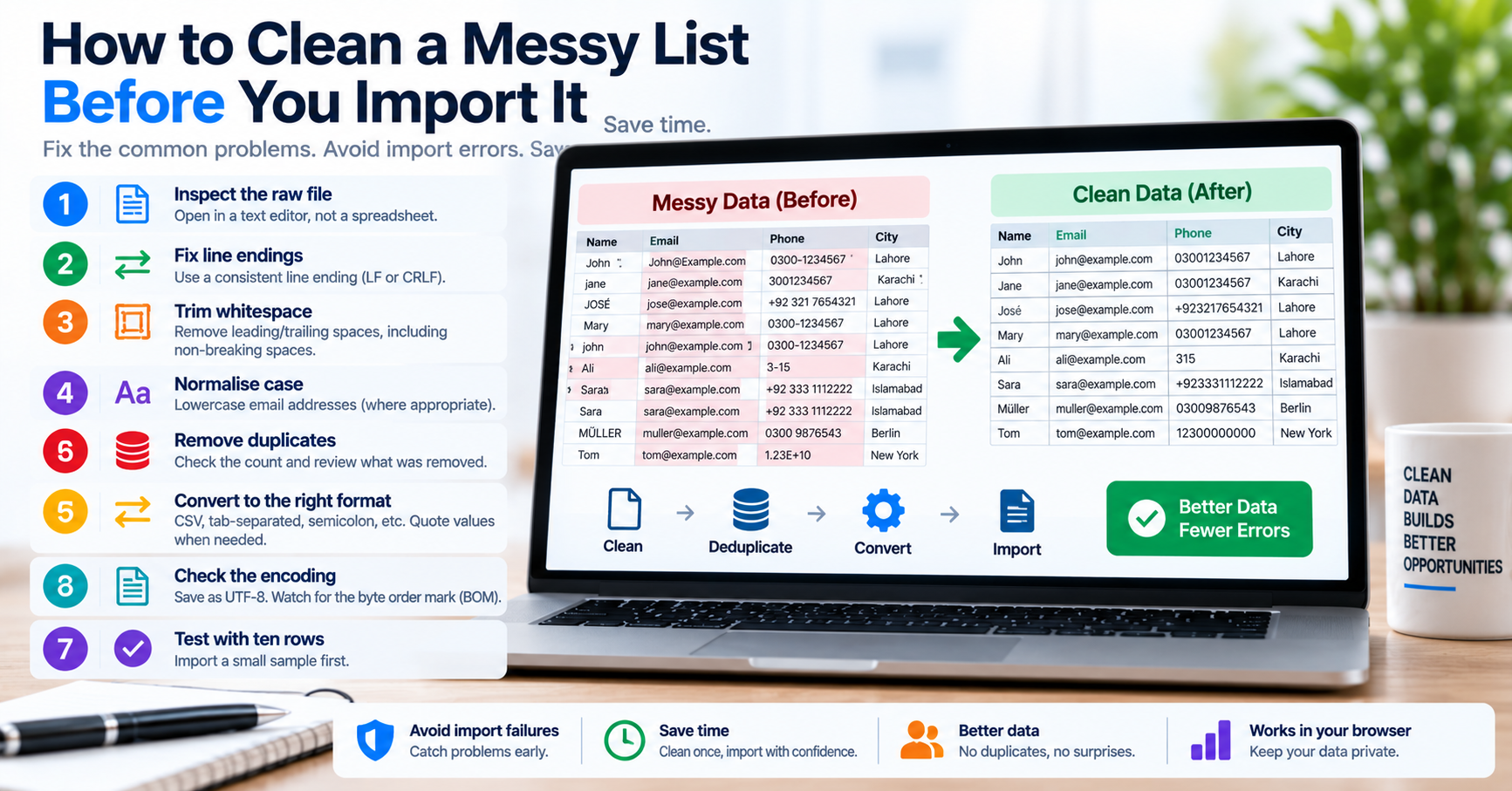
Every data engineer, digital marketer, and software developer regularly encounters the challenge of messy text lists. You export a thousand email addresses from an email marketing platform, extract product SKUs from an legacy ERP system, or compile keyword targets from multiple SEO tools. Instead of receiving a clean, standardized list ready for immediate database ingestion, you receive an unstructured, messy blob containing mixed delimiters (tabs, commas, spaces, and line breaks), duplicate entries, and invisible Unicode whitespace.
Attempting to import this raw data directly into a relational database (PostgreSQL, MySQL) or analytical warehouse (BigQuery, Snowflake) inevitably triggers schema errors, unique constraint collisions, or silent data truncation. Understanding the principles of programmatic text tokenization, sanitization, and delimiter transformation is essential for reliable data pipelines.
The 5 Stages of Production List Transformation
Transforming an unorganized list into clean, production-ready records requires a structured, multi-stage processing pipeline:
| Stage | Operation | Algorithmic Mechanism | Problem It Solves |
|---|---|---|---|
| 1. Tokenization | Splitting text into discrete elements | Delimiter matching using exact string scans or regular expressions (\r\n|\r|\n) |
Converts continuous text blobs into addressable array items. |
| 2. Whitespace Stripping | Trimming leading and trailing spaces | Unicode-aware trim removing ASCII 32 and non-breaking spaces (U+00A0) | Prevents silent database lookup failures where " user" fails equality checks. |
| 3. Empty Token Discard | Filtering zero-length strings | Predicate filter removing strings where length === 0 |
Eliminates phantom NULL rows generated by consecutive double line breaks. |
| 4. Deduplication | Eliminating redundant items | $O(n)$ hash-set insertion preserving first-seen index order | Prevents primary key collision errors during batch SQL INSERT operations. |
| 5. Delimiter Joining | Reformatting output stream | Joining tokens with target delimiter (e.g., comma, tab, newline, or SQL quotes) | Formats tokens into the exact structure expected by downstream applications. |
Transforming Lists for SQL WHERE IN Clauses
One of the most frequent daily tasks for developers is querying a specific subset of IDs or identifiers in an SQL database. When a manager provides a spreadsheet column containing 200 customer IDs:
USR-9481
USR-2940
USR-8812
Pasting this raw list directly into a SQL console produces a syntax error. SQL requires single quotation marks around each string literal and comma separation: WHERE customer_id IN ('USR-9481', 'USR-2940', 'USR-8812'). Formatting this manually takes 10 minutes of tedious typing; using the Text Separator with SQL wrapping accomplishes the transformation in under one second.
High-Performance Python Implementation for Large Datasets
For automated backend pipelines processing millions of rows, the following memory-efficient Python generator demonstrates production tokenization and deduplication without consuming gigabytes of RAM:
from typing import Generator, Set

def stream_clean_tokens(
    raw_text: str,
    delimiter: str = "\n",
    case_sensitive: bool = False
) -> Generator[str, None, None]:
    seen: Set[str] = set()

    # Split text into tokens
    for token in raw_text.split(delimiter):
        cleaned = token.strip()
        if not cleaned:
            continue

        lookup_key = cleaned if case_sensitive else cleaned.lower()
        if lookup_key not in seen:
            seen.add(lookup_key)
            yield cleaned

# Example usage
raw_input = "apple\n  orange \n\nbanana\nAPPLE\npear"
unique_tokens = list(stream_clean_tokens(raw_input))
print(", ".join(unique_tokens))
# Outputs: apple, orange, banana, pear
Interactive Diagnostic Checklist
- [ ] Always strip leading and trailing whitespace before applying deduplication filters.
- [ ] Decide whether deduplication should be case-sensitive (passwords/hashes) or case-insensitive (emails/domains).
- [ ] Use our free browser-based Text Separator for zero-upload local list reformatting.
- [ ] For multi-million line datasets, use stream-based processing to avoid browser memory limits.