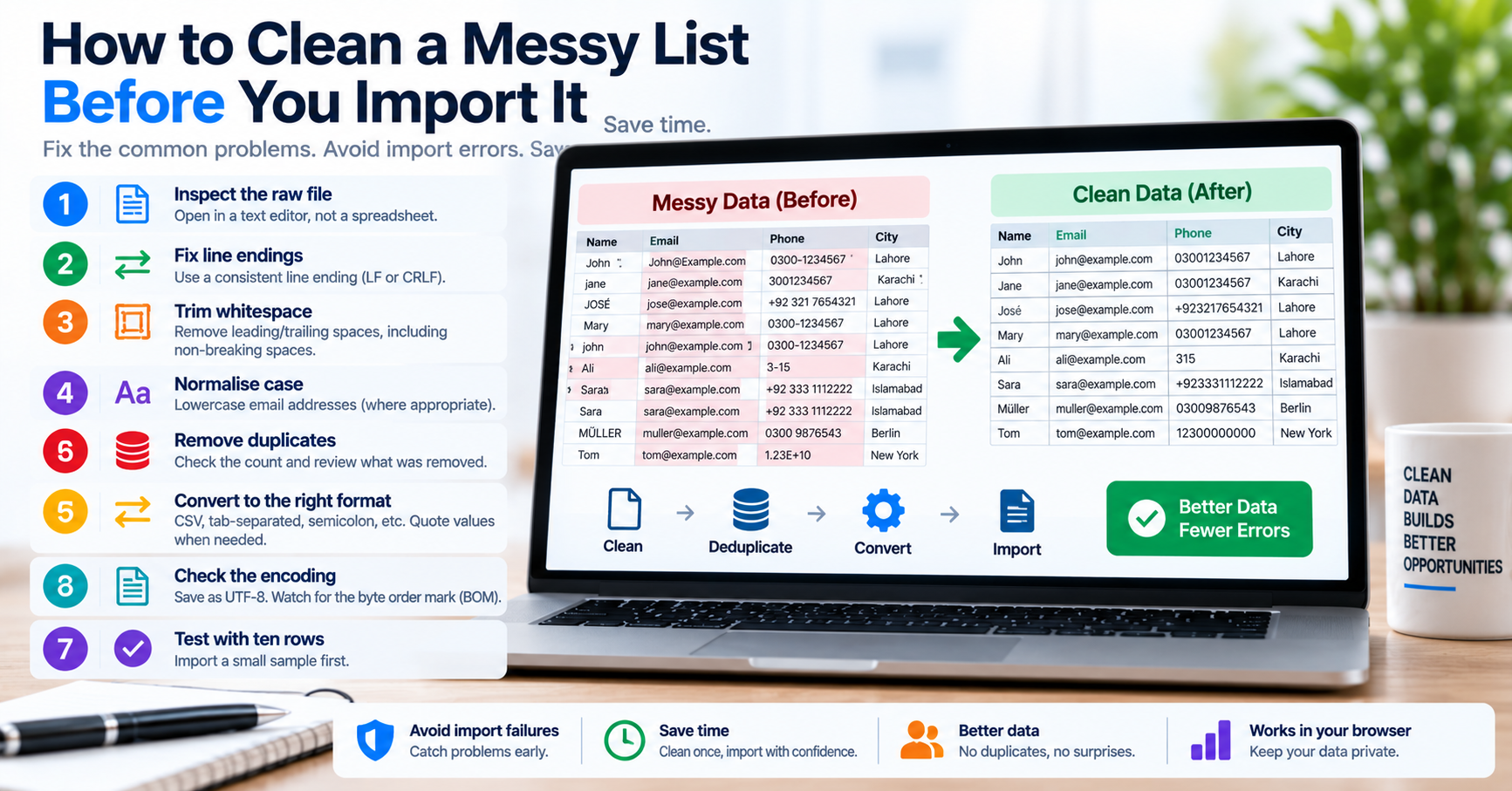
Every data engineering pipeline, database migration, and customer relationship management (CRM) onboarding workflow shares a common vulnerability: the raw import list. Whether exporting contact leads from a conference registration form, merging legacy spreadsheet rows, or preparing primary key arrays for a batch SQL update, incoming data rarely conforms to strict production schema requirements. Unsanitized lists contain trailing spaces, accidental duplicate entries, mismatched delimiters, unescaped quotation marks, and non-printable control characters.
Importing dirty data directly into a production database triggers database integrity constraint failures, creates duplicate customer accounts, skews financial analytics, and can crash backend import jobs halfway through. In this guide, we provide a structured, step-by-step playbook to clean, validate, and restructure messy datasets prior to ingestion.
The 6-Step Data Cleansing Workflow
| Step | Cleansing Operation | Common Data Corruption Resolved |
|---|---|---|
| 1 | Strip Byte Order Marks (BOM) | Eliminates \uFEFF prepended by Excel that corrupts column headers. |
| 2 | Whitespace & Control Trimming | Strips leading/trailing spaces, non-breaking spaces (U+00A0), and carriage returns. |
| 3 | Delimiter Normalization | Converts inconsistent delimiters (semicolons, pipes) into standardized commas or tabs. |
| 4 | Deduplication | Filters duplicate rows using hash sets while preserving first-seen row ordering. |
| 5 | Type & Format Validation | Validates email syntax, date ISO 8601 formatting, and numerical ranges. |
| 6 | SQL / Schema Wrapping | Encloses strings in single quotes and escapes interior quotes for batch ingestion. |
Handling Delimiter Inconsistencies & Escape Quotation Rules
One of the most frequent points of failure during CSV imports is unescaped delimiters inside literal data fields. For example, if a company name is recorded as Acme, Inc. inside a comma-separated file, a naive CSV parser will split the field into two separate columns: "Acme" and " Inc.". This shifts all subsequent columns by one position to the right, causing postal codes to land in phone number columns and email addresses to land in date fields.
According to RFC 4180 (the official CSV specification), any field containing commas, line breaks, or double quotation marks must be enclosed in double quotes. Furthermore, if a literal double quote appears inside the field, it must be escaped by prefixing it with an additional double quote (e.g., "He said ""Hello""").
Batch Database Ingestion: SQL LOAD DATA & Postgres COPY
Once your list is sanitized, passing it into relational databases requires high-throughput batch ingestion techniques rather than executing thousands of individual INSERT statements:
-- MySQL High-Speed Bulk Import
LOAD DATA LOCAL INFILE '/path/to/cleaned_leads.csv'
INTO TABLE leads
FIELDS TERMINATED BY ','
ENCLOSED BY '"'
LINES TERMINATED BY '\n'
IGNORE 1 ROWS
(email, first_name, last_name, company);

-- PostgreSQL Bulk Copy
COPY leads(email, first_name, last_name, company)
FROM '/path/to/cleaned_leads.csv'
WITH (FORMAT csv, HEADER true, DELIMITER ',');
Python Automated Cleansing Script
import re

def clean_data_pipeline(raw_text: str) -> list:
    # 1. Strip UTF-8 BOM if present
    text = raw_text.lstrip('\ufeff')

    seen = set()
    cleaned_rows = []

    for line in text.splitlines():
        # 2. Normalize whitespace and non-breaking spaces
        line = line.replace('\u00a0', ' ').strip()

        # 3. Skip empty lines
        if not line:
            continue

        # 4. Case-insensitive deduplication key
        key = line.lower()
        if key not in seen:
            seen.add(key)
            cleaned_rows.append(line)

    return cleaned_rows
Interactive Client-Side Cleansing Utilities
When you need to clean data quickly without writing custom Python scripts, utilize TU Web Tools' free, privacy-first utilities: - Clean and delimit lists using the Text Separator. - Filter out duplicate rows instantly with the Duplicate Line Remover. - Extract valid contact records from messy text with the Email Extractor.