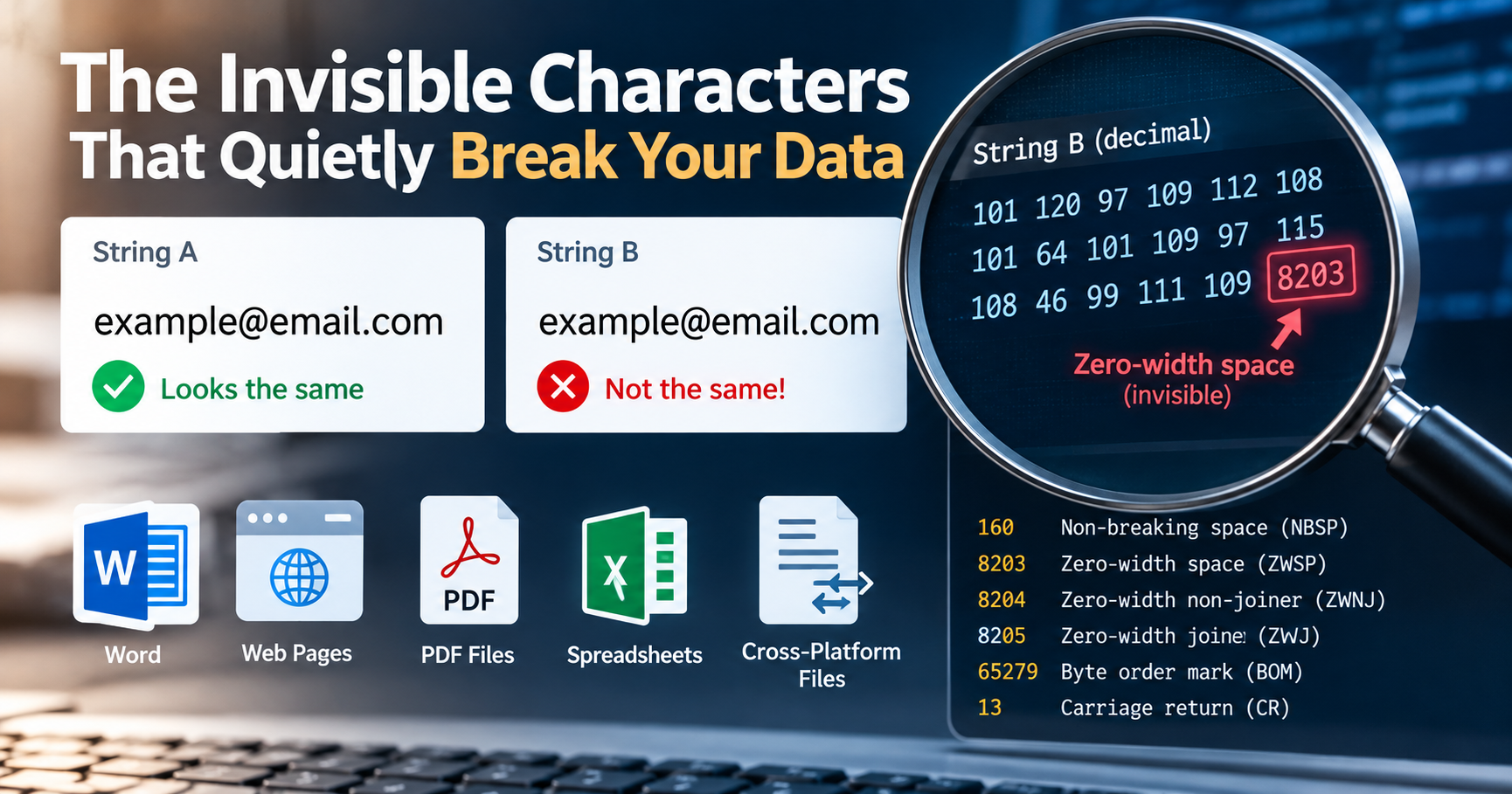
There is a specific category of software defect that can consume an entire engineering afternoon while leaving behind no obvious trace in standard application error logs. Two strings appear completely indistinguishable on your high-resolution monitor. You copy both values into a plain text editor, compare them character by character, and confirm that both visually read "admin". Yet your automated test suite fails, your relational database query returns zero matching records, or your nightly CSV import pipeline crashes on row 142 with an unhandled unique constraint violation. You stare at your terminal in disbelief: the strict equality expression "admin" === "admin" evaluates to false.
The strings are not identical. Lurking within one of those strings is a non-printing Unicode character—a byte sequence with no visible typographical glyph representation. Until you inspect the underlying byte stream, these invisible characters will quietly evade visual detection, skew financial analytics, break security authentication mechanisms, and corrupt production databases.
The Six Most Common Culprits in Production Data
The vast majority of invisible character incidents in modern software engineering trace back to six specific Unicode code points. Understanding their technical origin, byte representation, and intended typographical purpose is the first step toward building automated defenses.
| Character Name | Unicode Point | UTF-8 Hex Bytes | Decimal | Common Origin Source |
|---|---|---|---|---|
| Non-Breaking Space (NBSP) | U+00A0 | 0xC2 0xA0 |
160 | HTML , Word processors, macOS Option+Space |
| Zero-Width Space (ZWSP) | U+200B | 0xE2 0x80 0x8B |
8203 | Rich-text copy-pasting, micro-typography break hints |
| Zero-Width Non-Joiner (ZWNJ) | U+200C | 0xE2 0x80 0x8C |
8204 | Persian/Arabic scripts, complex emoji sequences |
| Byte Order Mark (BOM) | U+FEFF | 0xEF 0xBB 0xBF |
65279 | Windows Notepad, Microsoft Excel CSV exports |
| Carriage Return (CR) | U+000D | 0x0D |
13 | Windows CRLF line endings ingested in Linux environments |
| Left-to-Right / Right-to-Left Marks | U+200E / U+200F | 0xE2 0x80 0x8E |
8206 | Bidirectional text formatting in multilingual applications |
1. The Non-Breaking Space (U+00A0) Trap
The Non-Breaking Space is by far the most pervasive stowaway in modern web data. Engineered in typography to prevent automatic line wrapping between words that belong together (such as "100 km" or "Dr. Smith"), it renders visually identical to a standard ASCII space (U+0020). On macOS, pressing Option + Space inadvertently inserts U+00A0 instead of ASCII 32.
The critical danger is that standard whitespace trimming functions across programming languages (including JavaScript's legacy trim(), Python's default regex whitespace checks, and SQL's TRIM()) historically look only for ASCII 32. Consequently, an input like "user@domain.com\u00A0" survives validation, enters your database, and fails all subsequent exact-match equality lookups.
2. The Zero-Width Space (U+200B) Attack Vector
The Zero-Width Space possesses exactly zero physical pixel width. When placed inside a word, email address, or username, selecting or highlighting the text reveals nothing unusual. Yet, it adds three raw bytes (0xE2 0x80 0x8B) to the UTF-8 payload. Cybercriminals exploit ZWSP in homograph spoofing attacks: an attacker registers an administrator account with the username admin, which visually renders as admin but registers as a completely unique record in the database, bypassing duplicate check filters.
3. The UTF-8 Byte Order Mark (U+FEFF) Parser Crash
The Byte Order Mark was originally intended for UTF-16 architectures to indicate byte endianness. In UTF-8, byte order is fixed, meaning a BOM is technically unnecessary. Nonetheless, applications like Microsoft Excel and Windows Notepad prepend three bytes (0xEF 0xBB 0xBF) to the beginning of exported CSV files. When your backend script parses the header row, it interprets the first column key not as "id", but as "\uFEFFid". The column lookup returns undefined, and your entire database import halts with an unhandled exception.
Diagnostic Techniques: Inspecting the Underlying Bytes
The gold standard for debugging invisible character issues is to stop relying on visual display and inspect the underlying numeric byte stream directly. Our free ASCII Converter converts any pasted text into decimal, hexadecimal, and binary values instantly. A normal space displays as 32; a non-breaking space reveals itself as 160; and a zero-width space shows up as 8203.
Command-Line Inspection Using Hexdump
# Bash: Inspect raw hex bytes using xxd or hexdump
echo -n "admin" | xxd -p
# Expected standard ASCII output: 61646d696e
# Contaminated string with zero-width space:
echo -n "admin" | xxd -p
# Corrupted output: 6164e2808b6d696e (notice the e2808b sequence!)Automated Sanitation Pipelines Across Languages
Rather than debugging invisible characters after they corrupt your production database, enforce automated normalization filters at your API boundary:
// Node.js / JavaScript Universal Normalization Function
function sanitizeInput(str) {
    if (typeof str !== 'string') return str;
    return str
        .replace(/^\uFEFF/, '') // Strip UTF-8 BOM
        .replace(/[\u00A0\u1680\u180E\u2000-\u200A\u202F\u205F\u3000]/g, ' ') // Convert weird spaces to ASCII 32
        .replace(/[\u200B-\u200D\uFEFF\u00AD]/g, '') // Strip zero-width characters
        .replace(/\r\n/g, '\n').replace(/\r/g, '\n') // Normalize CRLF to LF
        .trim();
}
# Python Production Data Cleansing Pipeline
import re
def clean_invisible_characters(text: str) -> str:
# 1. Remove UTF-8 Byte Order Mark
text = text.lstrip('\ufeff')
# 2. Normalize non-breaking spaces to standard space
text = text.replace('\u00a0', ' ')
# 3. Strip zero-width spaces, joiners, and soft hyphens
text = re.sub(r'[\u200b\u200c\u200d\u00ad]', '', text)
# 4. Standardize line breaks
text = text.replace('\r\n', '\n').replace('\r', '\n')
return text.strip()Developer Diagnostic Checklist
- ✓ String equality checks failing? Paste both strings into our ASCII Converter to compare decimal byte values.
- ✓ CSV imports skipping header rows? Check row 1, column 1 for the
0xEF 0xBB 0xBFUTF-8 BOM signature. - ✓ Regex validation failing on valid emails? Inspect for trailing Non-Breaking Spaces (U+00A0) introduced by rich-text copy-pasting.
- ✓ Sanitize at API ingress: Never store raw unnormalized strings in primary key columns or security authorization records.